 AHX
Of all the reasons in Search Console's Page indexing report, this one causes the most confusion. Nothing is technically broken. Google found the page, fetched it successfully, read it, and then decided not to add it to its index. The report's "Source" column even says Google systems, not Website: this was Google's choice, not an error on your side.
That's also why there's no single fix. Google doesn't index everything it crawls. It indexes what it thinks is worth showing to searchers, and it has room to be picky. "Crawled – currently not indexed" is the bucket for pages that didn't make the cut, for now.
The good news: the reasons fall into a small number of patterns, and once you know which pattern your pages fit, the fix is usually clear.
First: is it actually a problem?
Open the report, click the reason, and look at the example URLs. A lot of what lands here is harmless:
- Feeds and technical URLs:
/feed/,/comments/feed/,?replytocom=, JSON endpoints,/wp-json/. Google found them, doesn't need them, and you don't want them in search either. - Paginated archives:
/blog/page/7/,/category/news/page/3/. These exist to help Google find posts, not to rank. - Filtered or sorted lists:
?sort=price,?color=red&size=m. - Internal search results:
/?s=shoes,/search?q=. - Pages you just published: Google sometimes crawls first and decides later. A new page can sit here for days or weeks before it's indexed.
If the list is mostly these, you can largely leave it alone. It only matters when pages you want in search are in it: products, services, articles, location pages.
The real reasons, and how to recognise each one
1. The page doesn't add enough
This is the most common cause. Google compares your page with everything else it already has on the topic and concludes that yours doesn't add anything new. Typical examples:
- Product pages with only the manufacturer's description, the same one 200 other shops use.
- Location pages that differ only by the city name ("Plumber in Leeds", "Plumber in York", same text).
- Short posts that restate what's already on page one of Google.
- Tag and category pages that list the same three posts as each other.
- Pages that are mostly navigation, footer and ads, with very little main content.
How to recognise it: the affected pages are short, templated, or very similar to each other, and the pages that are indexed in the same section are the longer, more original ones.
What to do: make the page genuinely more useful (original detail, photos, specifications, prices, answers to real questions), merge several weak pages into one strong page and redirect the others to it, or, if a page will never be worth searching for, add noindex and stop asking Google to index it.
2. It's a duplicate, and Google picked another version
If the page is the same as (or very close to) another URL, Google keeps one and leaves the rest. Sometimes those leftovers show up here instead of under the "Duplicate" reasons.
How to recognise it: run the URL through URL Inspection and look at "Google-selected canonical". If it names a different URL, Google sees this page as a copy.
What to do: decide which version should rank, and point everything at it: a rel="canonical" tag on the copies, internal links to the main version, only the main version in your sitemap. If both pages should rank, they need to be clearly different. Our guide to Google choosing a different canonical goes through this in detail.
3. Google doesn't think the page is important
Google uses links (from your own site and from others) as a strong signal of which pages matter. A page that's five clicks deep, linked only from an XML sitemap or a paginated archive, is telling Google "this isn't very important".
How to recognise it: the page has few or no internal links pointing to it, isn't in your main navigation or any hub page, and has no links from other sites.
What to do: link to it from relevant, already-indexed pages, with descriptive anchor text. Add it to a category or hub page. Keep important pages within two or three clicks of the homepage. This alone gets many "crawled, not indexed" pages indexed within a few weeks.
4. The content isn't there when Google looks
If the main content is loaded by JavaScript and something fails (a blocked script, an API that times out, content that only loads after scrolling or clicking), Google may see an almost empty page and decide it isn't worth keeping.
How to recognise it: in URL Inspection, run Test live URL, then View tested page → Screenshot and HTML. If the main text is missing from Google's rendered version, this is your problem.
What to do: render the main content on the server, or at least make sure it doesn't depend on scripts that robots.txt blocks, on user interaction, or on slow third-party calls.
5. Google doesn't trust the site yet
New sites, sites that published a lot of pages very quickly, and sites with many low-quality pages often see a large share of URLs here. Google is cautious about how much of an unproven site it indexes. Quality is judged partly at the site level, so a mass of weak pages can hold back the good ones.
How to recognise it: the problem affects many sections at once, the site is young or recently grew fast, and even good pages are slow to get indexed.
What to do: publish fewer, better pages; remove or noindex the weakest; earn a few genuine links and mentions from other sites. This is slow by nature: weeks to months, not days.
6. Spam signals or a hacked site
Auto-generated pages, scraped text, keyword-stuffed pages, or pages injected by a hacker (often in a language you don't use, selling pharmaceuticals or loans) all end up here in large numbers.
How to recognise it: a sudden jump in the count, and example URLs you don't recognise. Search site:yourdomain.com plus a word like "casino" or "viagra" to check for injected pages, and look at Search Console's Security issues report.
What to do: clean the site, remove the injected pages (let them return 404 or 410), close the security hole, and request a review if Google flagged the site.
Worked example: an online shop that invented its own pages
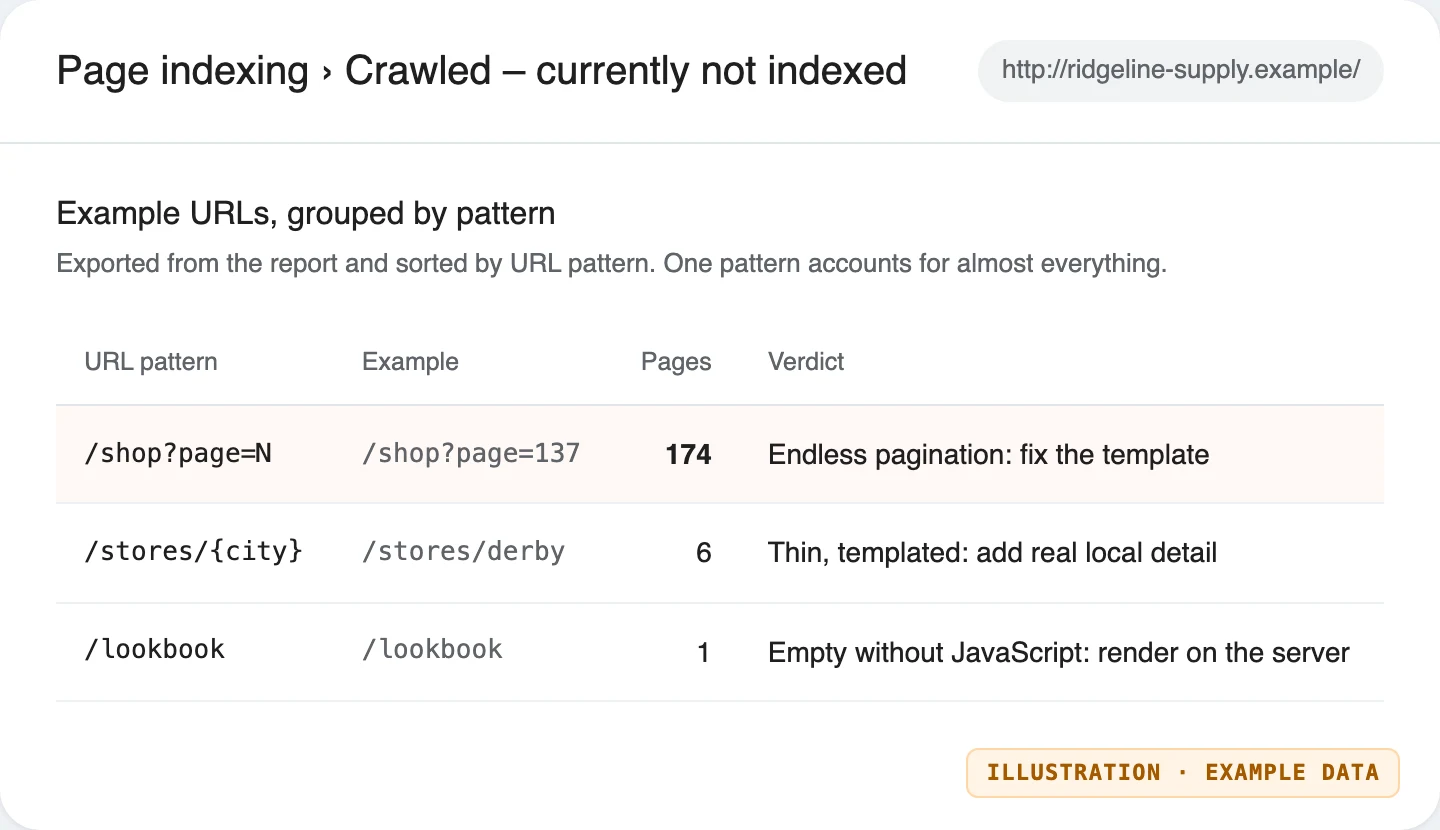
To show what this looks like, we built Ridgeline Supply Co., a made-up outdoor shop at ridgeline-supply.example (a domain reserved for examples), with six products. Its list template had one small bug: every list page linked to a "Next page", even when there was nothing left to show. So /shop?page=2 linked to /shop?page=3, which linked to /shop?page=4, forever.
Grouping the affected URLs by pattern makes the cause obvious straight away: almost every page in the bucket is the same thing.
We then ran a real AHX audit of the shop. With a 200-page budget, the crawler spent almost all of it on list pages that didn't need to exist, each with the same 41 words:
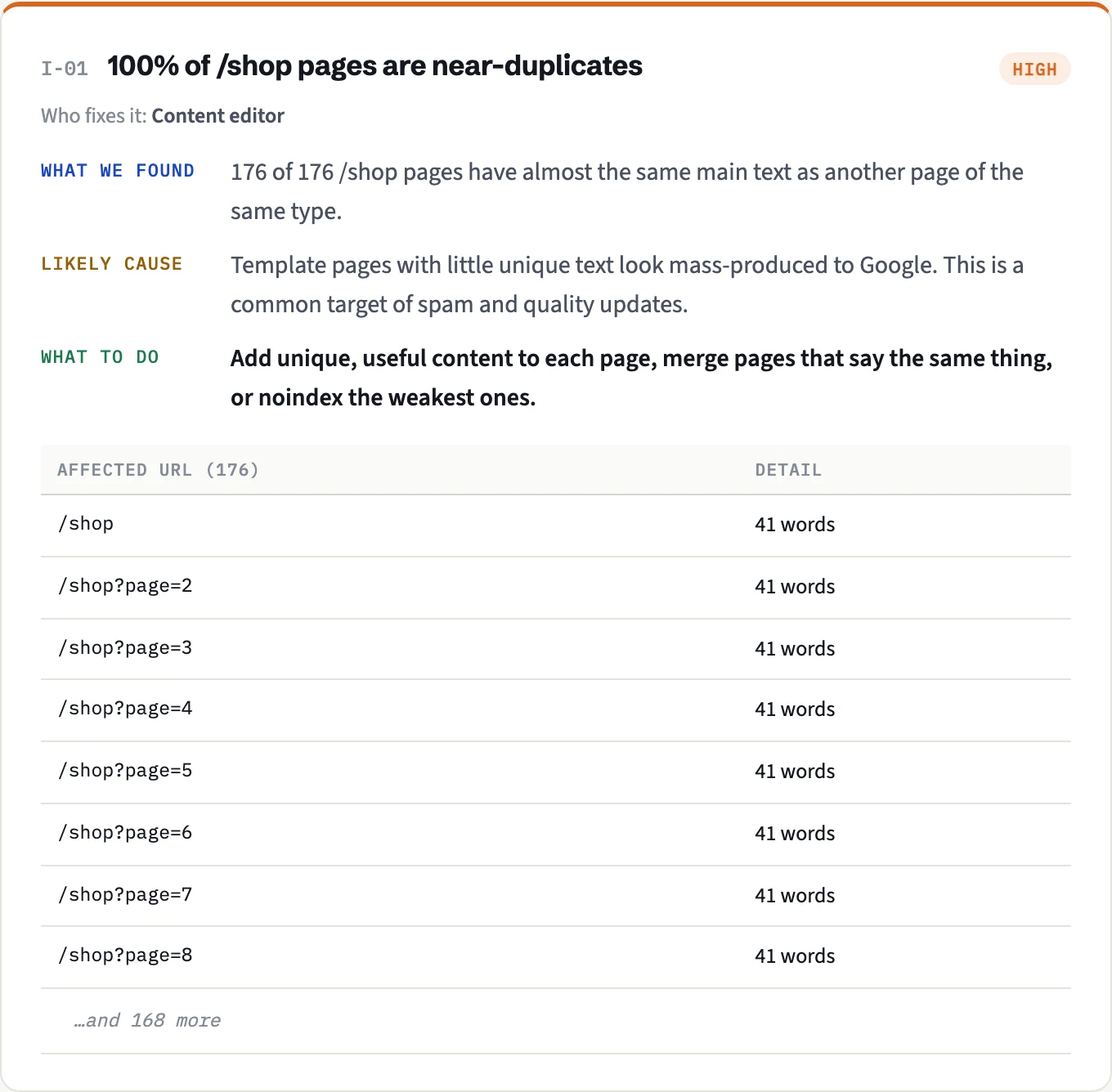
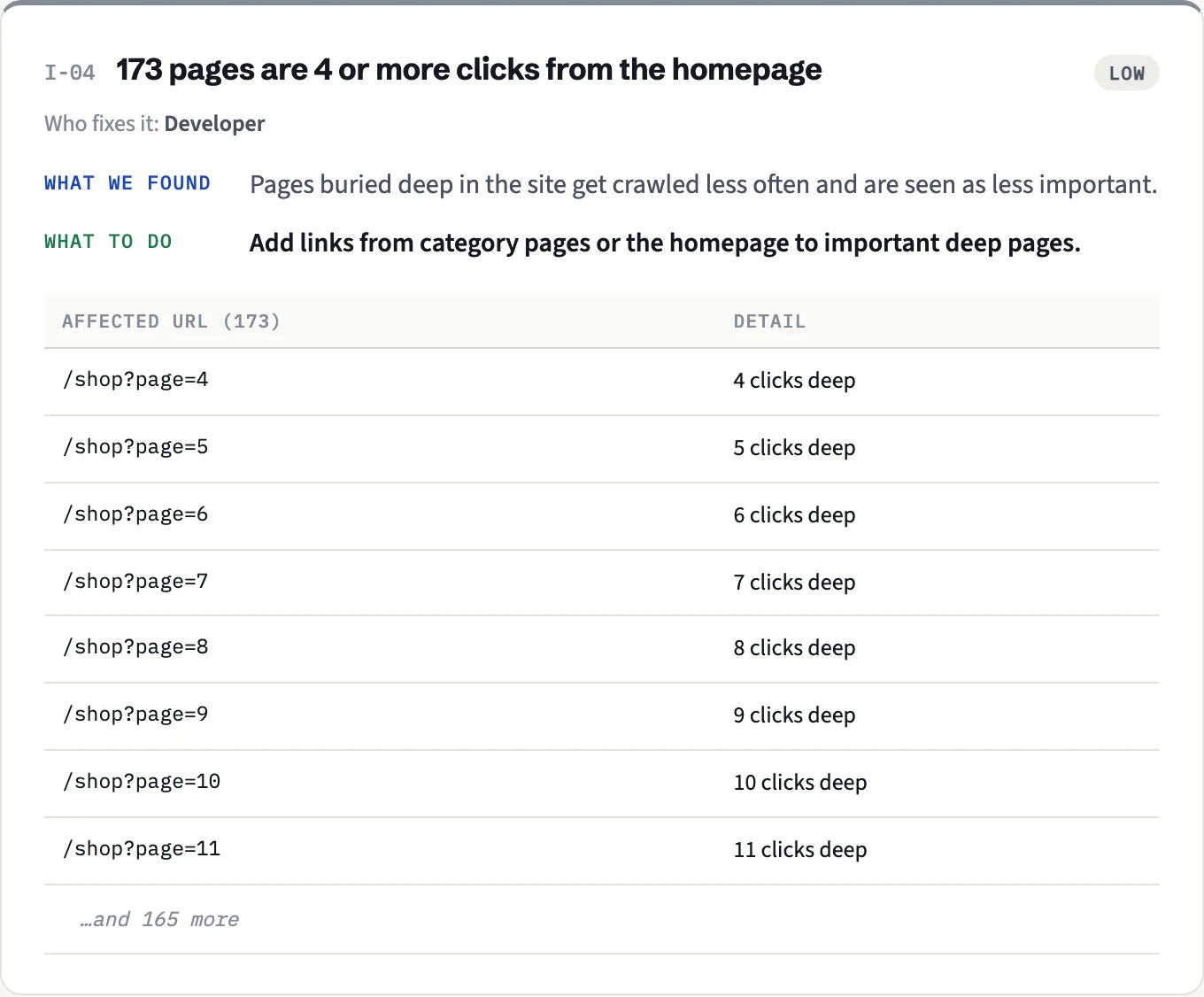
This is exactly the kind of page Google crawls and declines to keep: hundreds of near-identical, thin URLs, each one click deeper than the last. Worse, they use up crawl attention that should go to the six products.
The fix we tested: show "Next page" only when there is a next page, and make list pages past the end return 404. After the change, the same audit found 25 pages instead of 200, and the near-duplicate, thin-content and deep-page findings were all gone.
The same shop had a second, quieter case: an "Autumn lookbook" page whose content was added entirely by JavaScript. Without scripts it was an empty shell, the kind of page Google may fetch, see nothing, and leave out:
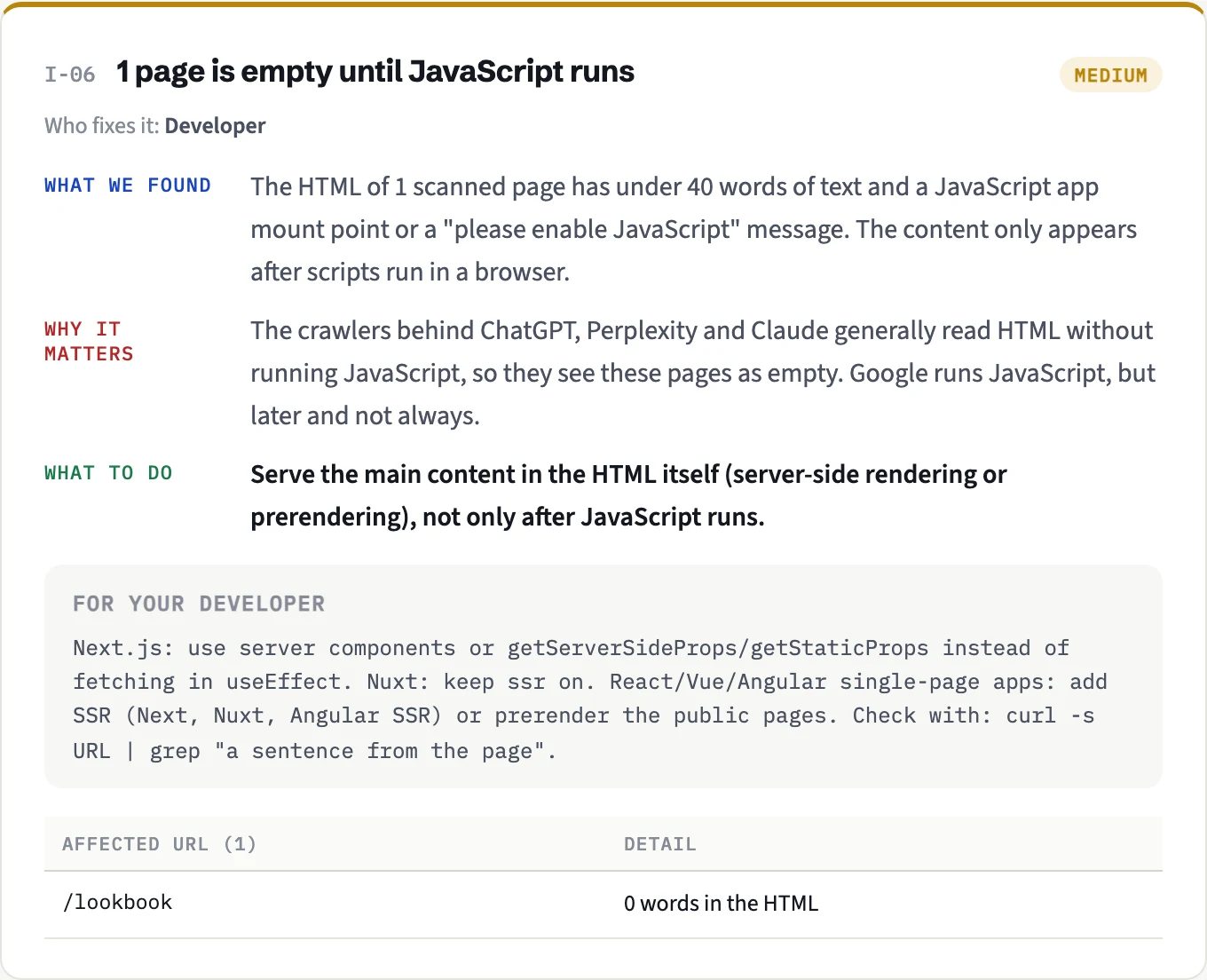
Rendering that text on the server fixed it; the page appeared in the next audit with its full content.
A practical way to work through the list
- Export the URLs and group them by section. Ignore the harmless types above.
- Pick three examples from each affected section and inspect them: Google-selected canonical, live test, rendered HTML.
- Match each section to one of the six reasons above. It's rarely more than two.
- Fix the cause, not the symptom. Pressing Request indexing on a page that Google already rejected rarely helps unless the page itself has changed.
- Validate, then wait. Click Validate fix in the report. Validation takes up to about two weeks and only re-checks pages; it doesn't force indexing.
How AHX helps
As in the example above, an AHX audit finds the causes on your side: near-duplicate and thin page types (which is how endless pagination shows up), pages buried many clicks deep, pages nothing links to, and pages that are empty until JavaScript runs. With Search Console connected, it also inspects a sample of your pages through Google's URL Inspection, groups the results by page type (so you see at a glance whether it's your products, your blog or your tag pages that Google leaves out), and shows Google's chosen canonical for each one.
Discussion
Questions, corrections or your own experience: all welcome.