 AHX
Unlike most statuses in the Page indexing report, this one isn't Google's decision. A noindex is a direct instruction: "don't show this page in search results". Google found it on these pages and obeyed.
So the question is never "why did Google do this?" but "who put the noindex there, and did they mean to?"
Where a noindex can come from
There are two places Google looks, and both count:
<!-- 1. In the page's HTML -->
<meta name="robots" content="noindex">
<meta name="googlebot" content="noindex"># 2. In the HTTP response headers (invisible in the page itself)
X-Robots-Tag: noindexThe header version is the one people miss. It can be set by the server, a CDN, a security plugin or a hosting control panel, and you won't find it by viewing the page source.
Intended noindex (leave these alone)
Plenty of pages should carry a noindex:
- Thank-you and confirmation pages, cart, checkout, account and login pages.
- Internal search results, and thin filter or sort combinations.
- Tag archives, author archives or date archives you've chosen not to index.
- Staging copies and test pages.
- Legal boilerplate you don't want competing in search.
If the example URLs are all like these, the report is simply listing your choices.
Accidental noindex: the usual suspects
"Discourage search engines" left on
WordPress has a setting under Settings → Reading called Discourage search engines from indexing this site. It's often switched on while a site is being built, and forgotten at launch. It adds a noindex to every page.
SEO plugin settings
Yoast, Rank Math and similar plugins let you noindex whole content types: categories, tags, products, media pages, author pages. One wrong toggle removes an entire section. Check both the global settings and the per-page "Allow search engines to show this page" option.
A noindex carried over from staging
A site built on a staging server with noindex (correctly), then copied to production without removing it. Common after migrations and redesigns.
Headers set by the server or a CDN
An X-Robots-Tag: noindex added in .htaccess, Nginx config, a CDN rule, or a hosting panel, sometimes meant for PDFs or staging, sometimes applied to everything.
JavaScript adding or changing the tag
If your HTML has no noindex but your JavaScript adds one (or a framework renders one by default for pages it considers "not found"), Google may see it after rendering. And if the HTML starts with noindex and JavaScript removes it later, Google may never render the page at all.
Check a page in two minutes
- URL Inspection → Test live URL → View tested page. Look at the HTML for a robots meta tag, and at More info → HTTP response for an
X-Robots-Tagheader. - Or from a terminal, check the headers and the HTML together:
curl -sI https://example.com/page | grep -i x-robots
curl -s https://example.com/page | grep -io '<meta[^>]*robots[^>]*>'Worked example: a noindex nobody could see
On Ridgeline Supply Co., a made-up shop we built at ridgeline-supply.example to reproduce this, the whole journal section dropped out of search. The team checked the pages and found nothing wrong: there is no robots meta tag anywhere in the HTML.
$ curl -s http://ridgeline-supply.example/journal/choosing-trail-shoes | grep -io '<meta[^>]*robots[^>]*>'
(no output: the HTML has no robots meta tag)
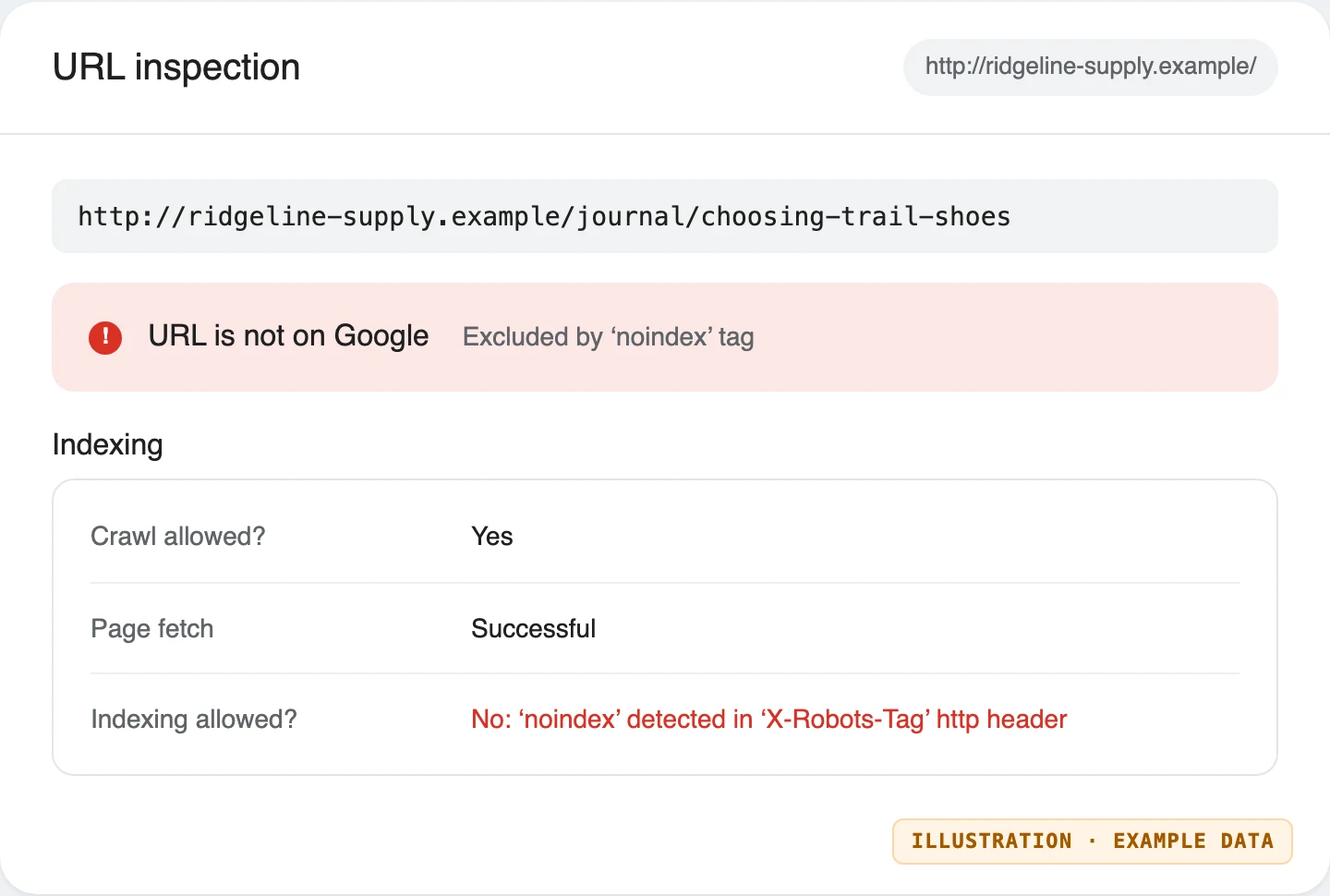
The instruction was in the response headers, left behind by a server rule from the staging site:
$ curl -sI http://ridgeline-supply.example/journal/choosing-trail-shoes | grep -i "^x-robots"
x-robots-tag: noindex
URL Inspection names the source precisely, which is the fastest way to tell a header from a meta tag:
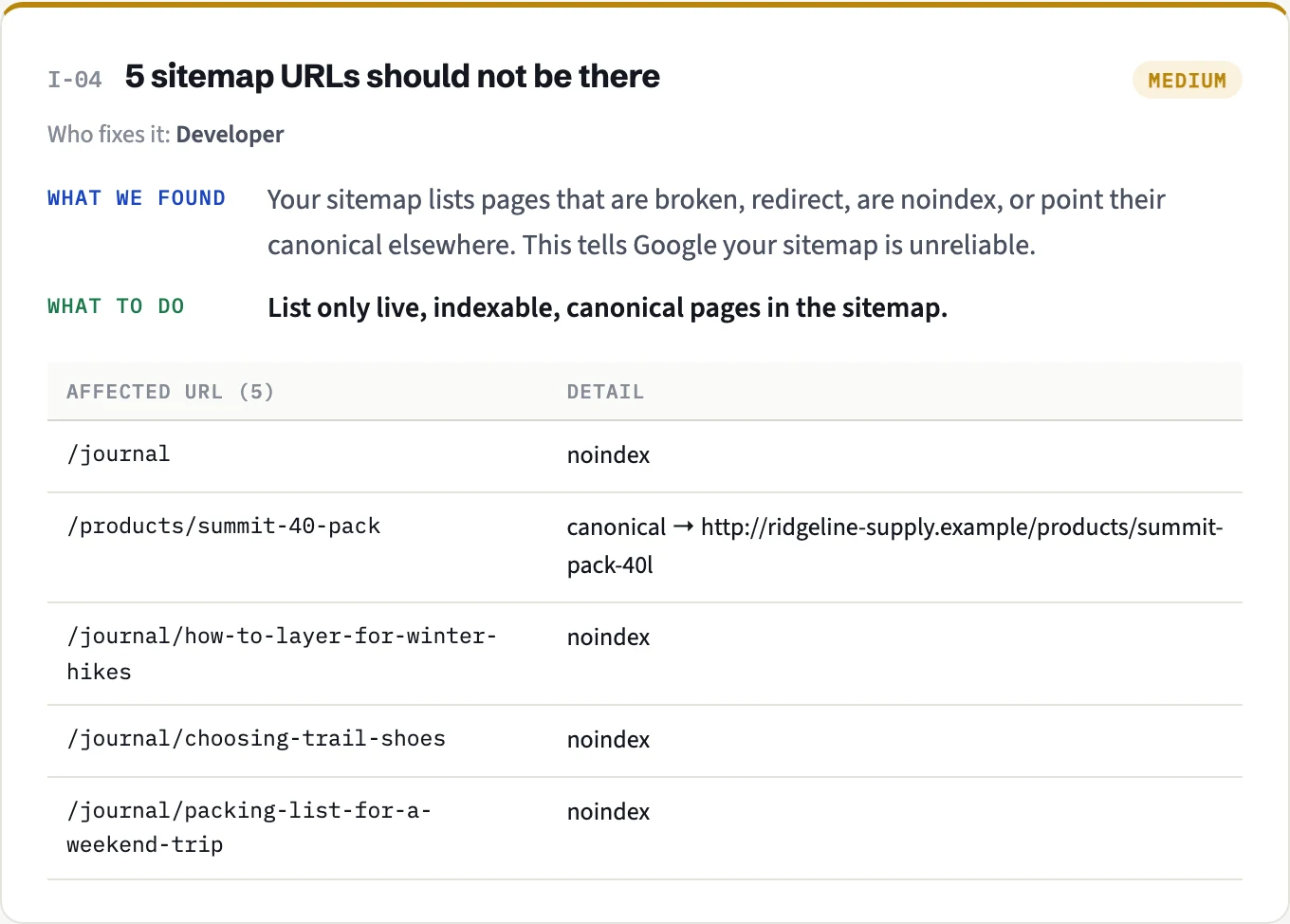
A real AHX audit of the shop caught it too, because AHX reads the headers of every page it crawls, and the journal posts were also listed in the sitemap: two opposite messages to Google.
The fix we tested: remove the header rule from the server configuration (not from each page), then check again:
$ curl -sI http://ridgeline-supply.example/journal/choosing-trail-shoes | grep -i "^x-robots" || echo "(no X-Robots-Tag header)"
(no X-Robots-Tag header)
The next audit no longer reported the journal pages. On a live site, this is the point to request indexing for the most important posts and click Validate fix.
Removing a noindex safely
- Remove it at the source: the plugin setting, the template, or the server rule, not page by page.
- Make sure the page isn't blocked in robots.txt. This one matters: if robots.txt blocks a page, Google can't fetch it, so it never sees that the noindex is gone. The reverse also applies: to remove a page from Google with noindex, don't block it in robots.txt.
- Make sure it's linked internally and listed in your sitemap.
- Request indexing for the most important pages, and click Validate fix in the report. Google recrawls and re-evaluates over the following days to weeks.
How AHX helps
An AHX audit reads both the robots meta tag and the X-Robots-Tag header on every page it crawls, so header-only noindex is caught too. It flags sitemap URLs that are noindex, and, with Search Console connected, warns about noindex pages that are still getting clicks from Google: the clearest sign that a noindex was added by mistake to a page that matters.
Discussion
Questions, corrections or your own experience: all welcome.