 AHX
A 404 means the server says "there's no page at this address". Search Console lists every URL where Google got that answer, and on an older site the number can be large: thousands, even tens of thousands.
Here's the first thing to know: a 404 is the correct response for a page that doesn't exist. Google's own guidance is that 404s are a normal part of the web and don't harm how the rest of your site ranks. Google will keep checking some old URLs for a long time, which is why they stay in the report.
So the goal isn't to make the report empty. It's to find the small number of 404s that are costing you something.
Where all these 404s come from
- Pages you deleted or products you removed.
- URLs that changed in a redesign, migration or permalink change, without redirects.
- Broken links on your own site, often from old posts, menus or a typo.
- Links from other sites to old or misspelled URLs.
- Old sitemaps that still list removed pages.
- Made-up URLs: bots probing for
/wp-admin, scrapers, and URLs Google found in JavaScript or text that aren't real links.
The 404s that matter
1. Pages that should exist
A page that's still part of your site, a product that's still for sale, a service you still offer, returning 404 by mistake: after a migration, a CMS change, a broken route, or an accidental delete.
Fix: restore the page, or 301 redirect the old URL to where the content lives now.
2. URLs that have links from other sites
Links from other websites are valuable. When they point to a 404, that value is lost.
Fix: 301 redirect the URL to the closest relevant page: the new version of the article, the product's replacement, or its category.
3. Broken links on your own site
Visitors click them and hit a dead end, and Google wastes visits on them.
Fix: update the link to the right URL. Don't just add a redirect and leave the broken link in place.
4. URLs listed in your sitemap
A sitemap should only list live pages. 404s in it tell Google your sitemap can't be trusted.
Fix: remove them from the sitemap (most CMSs regenerate it automatically once the page is properly deleted).
The 404s you can ignore
- Pages you removed on purpose, with no replacement and no valuable links.
- Junk URLs you never created (bot probes, malformed URLs, fragments of JavaScript).
- Old URLs whose content you've already redirected elsewhere and that now show up only because Google is rechecking them.
Leaving these as 404 is correct. Google will check them less and less often over time.
How to work through the list
- Export the examples and sort them by pattern (folder, file type, obvious junk).
- For each URL that looks real, inspect it and look at the Referring page (in URL Inspection) to see where Google found the link.
- Check your own site for broken internal links with a crawler, and fix them at the source.
- For URLs with links from other sites, add 301 redirects to the most relevant live page.
- Leave the rest. Click Validate fix only for the ones you actually fixed.
Worked example: two products that were removed, but not really
Ridgeline Supply Co. is a made-up shop we built at ridgeline-supply.example to reproduce problems like this. It stopped selling its glacier gaiters and storm poncho. The product records were deleted, but three things were left behind.
1. The pages answered "200 OK". Instead of a 404, the shop showed a friendly "Sorry, we couldn't find that page" with a success code:
$ curl -s -o /dev/null -w "%{http_code}
" http://ridgeline-supply.example/products/storm-poncho
200
A real AHX audit flagged both, along with a made-up address it requested on purpose to test the site's error handling:
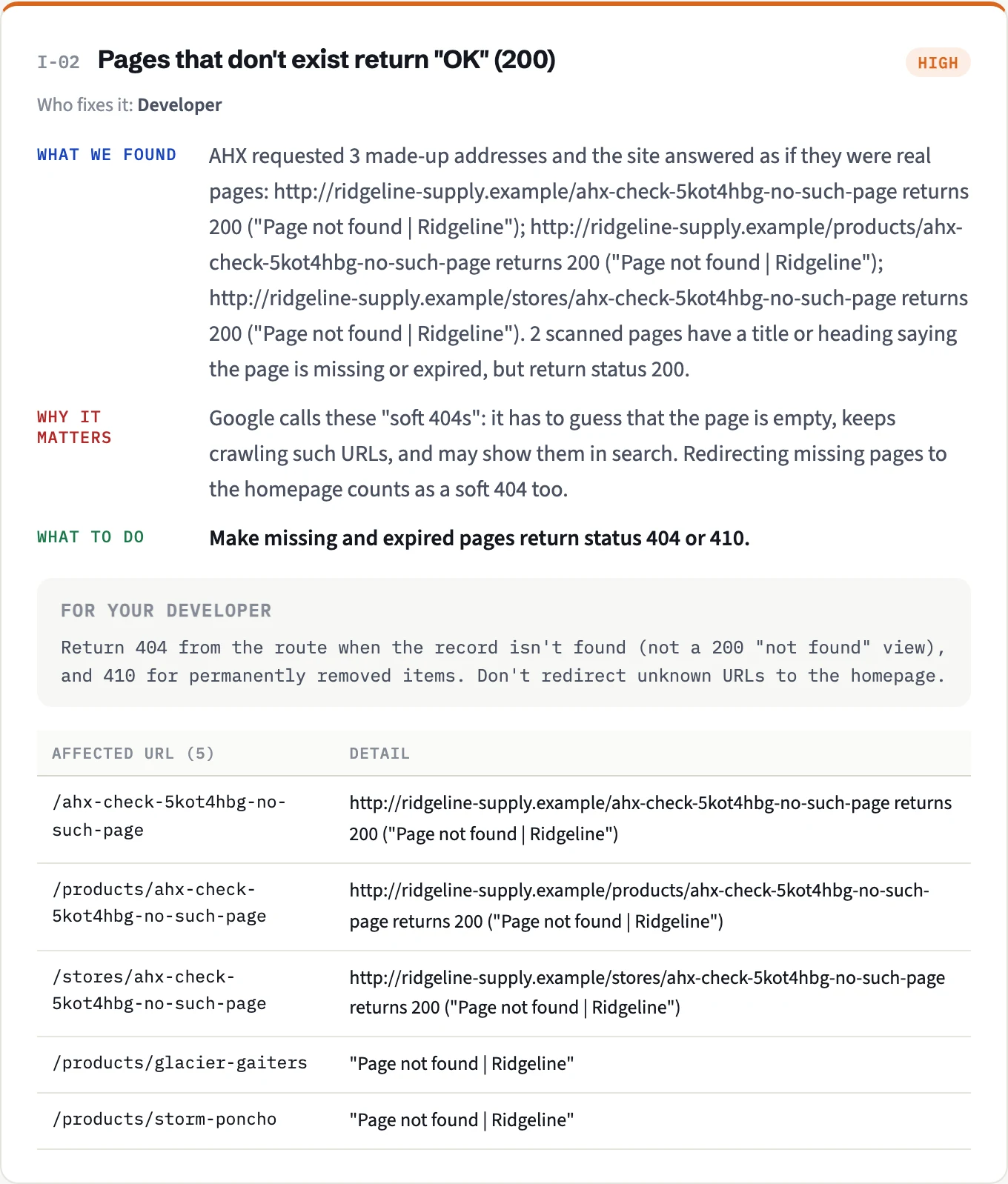
Google calls these soft 404s and reports them separately. Fixing the status code is step one, and it's what moves these URLs into Not found (404), which is where they belong.
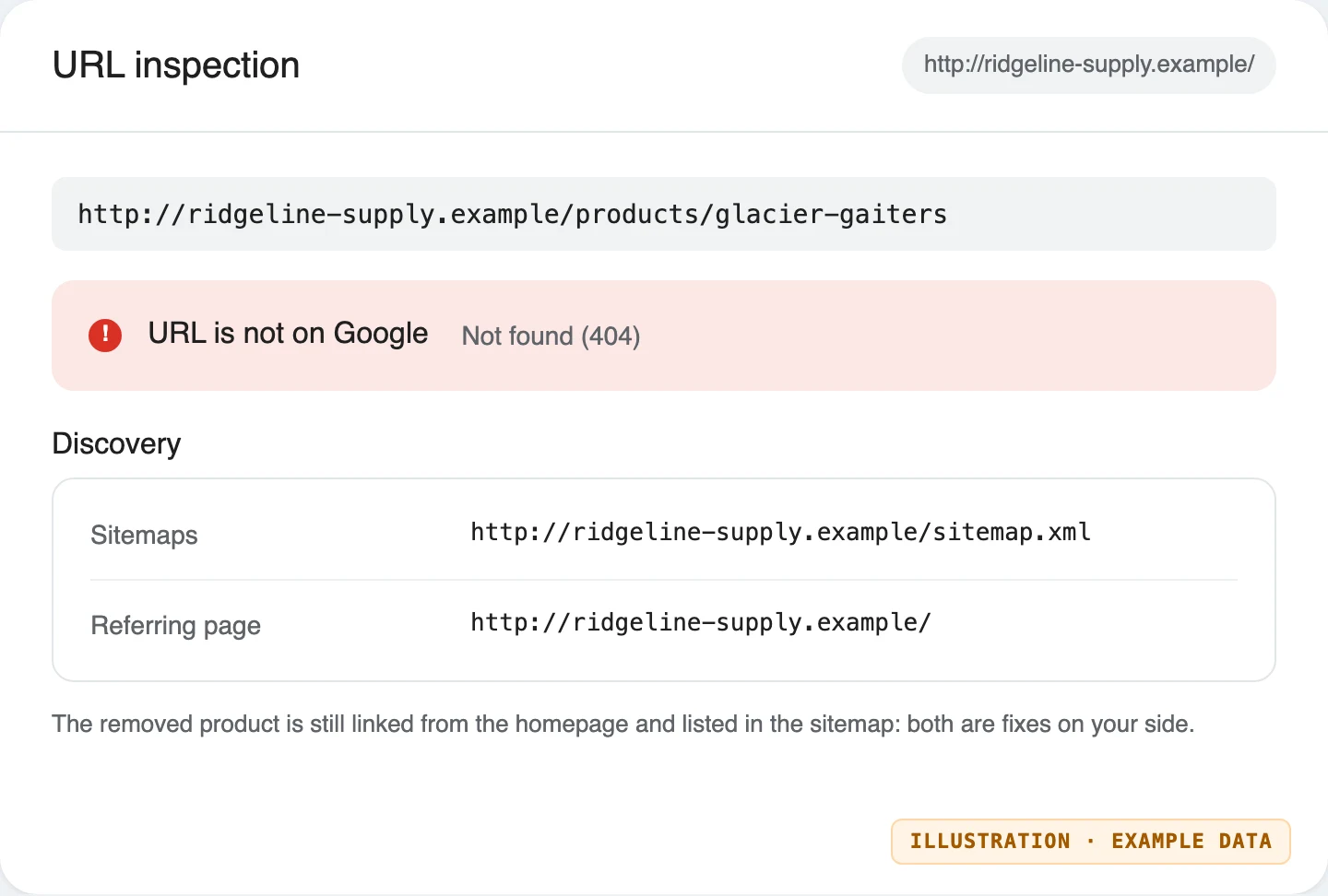
2. They were still linked. The homepage still linked to the gaiters, and the shop list to the poncho.
3. They were still in the sitemap. So Google kept being told they were important pages.
URL Inspection shows both leftovers for a removed URL, under Discovery:
The fix we tested, in this order:
- Return a real
404for anything that doesn't exist, with the same friendly page for visitors. - Remove the links to the old products from the homepage and the shop list.
- Take the old products out of the sitemap.
- Decide on redirects: neither product had a direct replacement, so both stay
404. If one had been replaced by a newer model, a 301 to that model would be right.
$ curl -s -o /dev/null -w "%{http_code}
" http://ridgeline-supply.example/products/storm-poncho
404
The next audit found no links to the removed products and no errors in the sitemap. Google will still check those two URLs now and then, see the 404, and drop them. That's the correct end state, not something to fix.
The mistakes that make things worse
- Don't return 200 for missing pages with a "not found" message. That creates soft 404s, which are worse than real 404s. See our guide to soft 404s.
- Don't block old URLs in robots.txt to hide them from the report. Google then can't see that they're gone, and they may linger in search longer.
- Use 410 Gone if a page is removed permanently and you want Google to drop it a little faster. Otherwise 404 is fine.
Make your 404 page useful
Some visitors will always land on a missing page. A good 404 page (with the 404 status code) keeps them: a short apology, a search box, and links to your main sections and most popular pages.
How AHX helps
An AHX audit crawls every link on your site and lists the ones that lead to errors, with the pages they appear on, so you fix broken links at the source. It flags sitemap URLs that return errors or redirect, follows redirect chains and loops, and checks that a made-up URL on your site returns a proper 404 instead of a soft 404.
Discussion
Questions, corrections or your own experience: all welcome.